
First impressions matter. Vetty lets Admin users customize the welcome email candidates receive when their screening begins, so it sounds like you from the very first message.
Create a single welcome email for all candidates or make custom versions for specific screening packages to match your workflow. Here’s how to make it yours.
Set a Universal Welcome Email For All Candidates
If you’d like the same welcome email to be sent to every candidate, follow these steps:
-
Click Customizations in the left navigation panel
-
Select Welcome Email
-
Click Edit Email to update the subject line and email body
-
Select Save Changes
And done! This email will now be sent to all your candidates.
Set Custom Welcome Emails for Different Packages
If you need different welcome emails for different screening packages, you can create and manage custom templates:
- Click Customizations in the left navigation panel.
- Select Welcome Email.
- Click Customize Welcome Email.
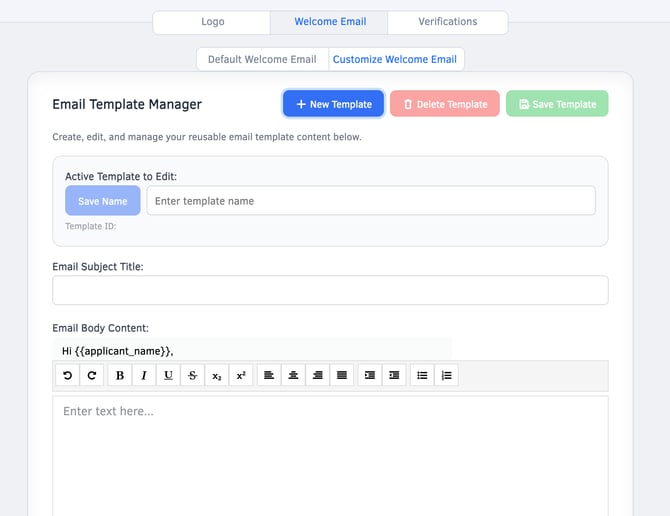
- Select New Template and name your template.
- Set the email subject line and body.
- You can also add any relevant file attachments here, if you'd like!
- Link the template to the appropriate packages by clicking Link next to the package name.
- Any time that package is ordered, this email template will be sent to those candidates.
- Scroll up and select Save Template.
And you're all set! Need to make updates down the road? You can edit templates, swap package links, and adjust messaging whenever your process evolves. Vetty makes it easy to deliver clear communication every time.