
So, your candidate still hasn’t started their background check?
No worries, we’ve got your back (and theirs). Vetty already does a lot of the nudging for you, but sometimes an additional tap on the shoulder does the trick. Here’s how to send them a new reminder.
How Vetty Handles Reminders
Every Vetty candidate gets a unique link delivered via email and text message (if enabled) to kick off their background check application.
If they don’t complete it right away, Vetty automatically sends five friendly reminders, one every 24 hours. Candidates who haven’t filled out their forms yet will show up as Pending Candidate.
How to Manually Resend a Reminder
-
Open your Vetty dashboard and click on the candidate you want to remind.
-
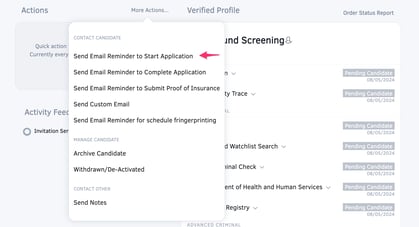
Select More Actions.
-
Choose Send Email Reminder to Start Application.
-
Add a Custom Message if you’d like.
-
Click Send Reminder.
Your candidate will receive the email in their inbox within 30 seconds. Easy!